
Home Office Electrical Upgrades: Twin Cities Guide

Key Takeaways
- Every new or extended circuit in a Minnesota home office requires AFCI protection under the 2023 NEC as adopted by the DLI. This is an inspection requirement, not a suggestion.
- A surge protective device at the panel is now code-mandatory on any panel replacement under NEC 2023 Article 230.67 - not an optional upgrade.
- A DLI electrical permit is required before any new circuit or outlet goes into an existing home. Inspection follows before walls close.
- Xcel Energy offers up to $1,500 on qualifying panel upgrades. Minnesota Commerce offers up to $7,000 in battery storage incentives - and the fund is dwindling.
- Self-employed homeowners may be able to depreciate panel and wiring improvements as home office capital expenses under IRS Publication 587.
- We are locally owned and operated in the Twin Cities and ready to schedule. Call 763-200-5956 or book online.
Home Office Electrical Upgrades Every Twin Cities WFH Homeowner Should Know About
The home office is no longer a guest room with a laptop parked on a folding table. It is a full workstation, a video-call studio, and sometimes a small server rack - all running off wiring that was sized decades before anyone streamed a Teams call from a Minnesota split-level. If your breaker trips when the laser printer fires up, or your monitors blink every time a storm rolls through, your electrical setup is the bottleneck. This guide covers the home office electrical upgrades that matter most for Twin Cities homeowners, what Minnesota code now requires, and what money is sitting on the table right now.
Why Does a Home Office Need Dedicated Circuits?
Short answer: A standard 15-amp household circuit supports roughly 1,440 to 1,800 watts safely. A workstation, dual monitors, a laser printer, and a space heater can exceed that in seconds. Sharing circuits with other rooms means nuisance trips - and repeated overloads run wiring hot in ways that create fire risk over time.
Most home circuits were designed for lamps, clocks, and the occasional vacuum. A modern WFH setup is a different load profile entirely. A desktop workstation alone draws 200 to 500 watts at load. A laser printer pulls 800 to 1,500 watts at startup - a brief spike that a shared circuit may not absorb cleanly. Add a space heater (1,500 watts) or a window air conditioner, and you are routinely at or above the safe threshold on a 15-amp circuit.
A dedicated circuit runs directly from the panel to one outlet location. Nothing else shares it. That eliminates the nuisance trips. It also makes fault isolation straightforward: if something goes wrong on that circuit, you know exactly what was on it.
Our dedicated circuit installation service is one of the most common home office calls we receive across the Twin Cities. It is a contained job - permitted, inspected, and typically done in a day.
What Exactly Is a Dedicated Circuit, and How Many Do I Need?
Short answer: A dedicated circuit serves only one device or outlet location, with its own breaker in the panel. For a home office, plan on one circuit per high-draw device: one for the workstation, one for the laser printer, and one for a NAS or small server if you have one. Lighter peripherals can share a circuit.
The rule of thumb: any device that regularly draws more than half of a circuit’s capacity gets its own breaker. That includes:
- Laser printers and multifunction copiers (high startup current draw)
- Desktop workstations or high-performance laptops with external docks
- Network-attached storage devices or a small server running 24/7
- A dedicated space heater or window air conditioning unit
Plug-in laptops, monitors, desk lamps, and phone chargers are lighter. A well-managed outlet strip on a shared circuit works fine for those. The heavy draws need their own lanes.
Read more about which appliances need dedicated circuits before you finalize your office layout. It is a short read and will save you a rework call later.
How Many Outlets Does a Home Office Actually Need?
Short answer: Plan for at least six to eight outlet positions in a dedicated office - two per desk wall, one at the door wall, one near the floor for charging devices. USB-A and USB-C combo outlets cut down on wall-wart adapters and are worth including where you charge most.
The two-outlets-per-wall standard made sense when a bedroom held a lamp and an alarm clock. It does not cover a workspace with monitors, webcam lights, charging pads, a router, a speaker, and a ring light for calls.
USB-A/USB-C combo receptacles eliminate the brick adapters that eat the adjacent outlet slot. They install in the same electrical box as a standard duplex outlet. The difference in daily convenience is immediate.
Here is the code piece that surprises most homeowners: when we add or extend a 120V, 15/20A branch circuit in a living area - which includes a home office - 2023 NEC as adopted in Minnesota requires arc-fault circuit interrupter (AFCI) protection on that circuit. AFCI breakers detect the arc signatures that standard breakers miss - the kind that start fires inside walls before any visible symptom appears. This is an inspection checkpoint, not a suggestion.
For older homes with ungrounded outlets throughout, see our guide on upgrading two-prong outlets - the home office is often the right place to start that project.
Is Whole-Home Surge Protection Now Required by Code in Minnesota?
Short answer: Yes - on any panel replacement or new service installation. NEC 2023 Article 230.67 requires a Type 1 or Type 2 surge protective device (minimum 10 kA) at the service entrance whenever a panel is replaced or a new service is installed. Minnesota adopted the 2023 NEC on July 1, 2023.
This is the detail that all three competing blog posts on this topic missed entirely. The SPD is not an optional add-on your electrician suggests at the end of the job. It is a mandatory part of any permitted panel replacement in Minnesota.
What does a panel-level SPD actually protect against? The grid delivers voltage that fluctuates constantly. Most fluctuations are small and invisible. But when a large inductive load on the grid switches off - or when the utility restores power after an outage - it can send a transient spike through every circuit in your home simultaneously. A panel-level device clamps that spike before it reaches your workstation, your NAS, or anything else plugged in.
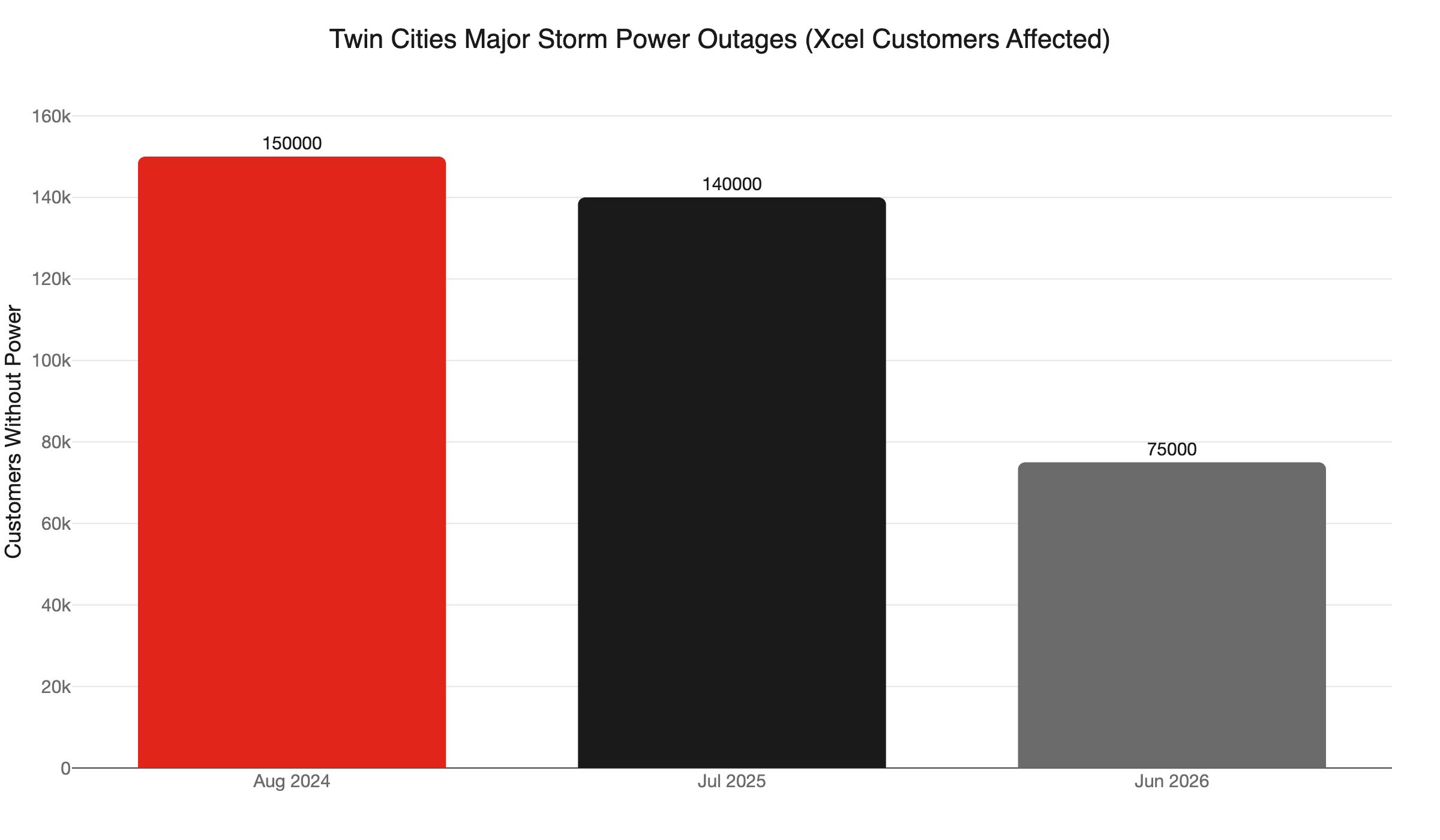
For a WFH household, the exposure is real and recurring. Twin Cities storms knocked out power to more than 140,000 Xcel customers over two nights in July 2025. A June 2026 storm event cut 75,000 customers in a single night. August 2024 affected 150,000 homes. Every restoration event sends a transient down the line. Without panel-level protection, your equipment absorbs it.
Point-of-use surge strips offer some protection but they are not a substitute for a panel-level device. The panel device intercepts the spike before it reaches the strip.
Read our full whole-home surge protection guide for a breakdown of device tiers and what the Minnesota inspection checklist actually requires.
Do I Need an Electrical Permit for Home Office Work in Minnesota?
Short answer: Yes - for any added circuit or outlet in an existing home. The DLI issues electrical permits statewide, not the city. The fee is a $25 base plus $6 per circuit (under 15 circuits) plus a $1 surcharge. Work must be inspected before drywall goes back up.
This catches a lot of Twin Cities homeowners off guard. In most states, building permits flow through the local building department. In Minnesota, electrical work is regulated by the DLI statewide - regardless of whether you are in Minneapolis, Maple Grove, Woodbury, or Blaine. The permit is pulled before work starts, and the rough-in must pass inspection before anything is closed in.
Unpermitted electrical work creates problems when you sell. Home inspectors flag it. Title companies flag it. And if something goes wrong with unpermitted wiring - a fire, a shock incident - your homeowner’s insurance has grounds to complicate a claim.
Our team handles the permit as part of every job. You do not navigate DLI paperwork yourself.
See our detailed breakdown at electrical permits in Minnesota to understand what the process looks like from start to inspection.
Does My Panel Support a Home Office Addition?
Short answer: A 100-amp panel in an older home may have no room for new circuits. Warning signs: every breaker slot is full, breakers feel warm to the touch, or the panel is filled with tandem (double-stacked) breakers throughout. A 200-amp panel gives you room for the office plus an EV charger or battery backup later.
Panel headroom is the foundation question. If the panel is full, the electrician cannot legally add breakers. Tandem breakers - two breakers in one slot - are allowed only in specific panel models and only in designated slots. They are not a long-term strategy for a loaded panel serving a modern home.
When a full panel upgrade is the right call, the timing is good right now. Xcel Energy offers up to $1,500 back when you upgrade to a higher-amperage panel using a DLI-licensed electrician. Because any panel replacement now triggers the NEC 2023 SPD requirement, the rebate effectively offsets part of the surge protection cost that is already code-mandatory. That is a clean alignment of incentives.
If your panel is a known problematic brand - Federal Pacific, Zinsco, or certain older Pushmatic models - the upgrade priority goes up. Our guide to dangerous electrical panel brands in Minnesota covers what to look for.
What Backup Power Options Work Best for a Home Office?
Short answer: A UPS (uninterruptible power supply) buys 10 to 30 minutes to save work and safely shut down during a short outage. A whole-home standby generator keeps you running indefinitely. Battery backup systems are silent, automatic, and eligible for Minnesota incentives that are running out.
Minnesota’s storm season runs May through August. Multiple severe events per season is the norm, not the exception. For someone billing hours or taking client calls from a home office, even a 20-minute outage has a real cost.
UPS (uninterruptible power supply): Connects between the wall and your workstation. Costs $100 to $400. Powers monitors and a desktop for 10 to 30 minutes. Good for brief brownouts and clean shutdowns. Does not cover the rest of the house.
Whole-home standby generator: Starts automatically within seconds of an outage. Runs on natural gas or propane. Powers the whole house, including HVAC and the home office. Requires a transfer switch - permitted and inspected. Our home generator sizing guide walks through what capacity a WFH household actually needs.
Battery backup (home energy storage): Silent, no combustion, charges from the grid or solar. Discharges automatically during an outage. Higher upfront cost, but the incentives are meaningful and time-sensitive.
Minnesota Commerce’s battery storage incentive pays $250 per kWh, up to $7,000, for customers outside Xcel’s service territory. Xcel-territory customers have a separate program with approximately $3.48 million remaining. As of July 6, 2026, the non-Xcel fund had $1,506,840 left - first-come, first-served. These funds will not replenish automatically.
Can I Deduct Home Office Electrical Upgrades on My Taxes?
Short answer: If you are self-employed and use part of your home exclusively for business, yes. IRS Publication 587 allows self-employed homeowners to depreciate electrical improvements - including panel work and new wiring - as capital home office expenses on Form 8829, Schedule C. The deduction is based on the business-use percentage of the home’s square footage. Remote employees generally cannot claim this deduction.
This is not tax advice - run it by your accountant. But it is a real incentive that many self-employed Twin Cities homeowners overlook entirely. A panel upgrade that costs $3,000 before the Xcel rebate may have a further after-tax cost that looks meaningfully different when the depreciation schedule is factored in.
The IRS rule is exclusive and regular use. A dedicated home office that no one uses as a guest room qualifies. A bedroom that doubles as a workspace does not. If your setup already meets that threshold, ask your accountant specifically whether panel and circuit work qualifies as a capital improvement under your business-use percentage.
What Does a Home Office Electrical Upgrade Cost in the Twin Cities?
Cost depends entirely on what you are starting with. A panel that has open slots and an office that needs two dedicated circuits looks very different from a maxed-out 100-amp panel that needs a full replacement plus new runs.
Rough ranges for context - not a quote, and every job is different:
- Adding one to two dedicated circuits: $300 to $600 per circuit, depending on panel distance and wall conditions, plus permit fee.
- Panel upgrade (100A to 200A): $2,000 to $4,500 in the Twin Cities market, before the Xcel rebate.
- Panel-level surge protective device (SPD): $300 to $600 installed - now required when the panel is replaced.
- Outlet additions with AFCI breaker: $150 to $350 per outlet location, depending on wall access and run length.
Apply the Xcel rebate of up to $1,500 to a panel upgrade and your net cost drops before a single incentive from the Commerce battery program enters the picture. Pair that with the IRS depreciation if you are self-employed, and the actual out-of-pocket can be considerably lower than the top-line number.
How to Sequence Your Home Office Electrical Upgrade
If you are working from home in the Twin Cities and your electrical setup has not caught up, here is how to prioritize:
- Assess the panel first. If it is full, the panel upgrade is the foundation. Circuits cannot be added legally without room to add breakers.
- Pull the permit. Our team handles this. The permit protects you at resale and ensures the work passes inspection.
- Run dedicated circuits for the workstation, printer, and any high-draw device in the office.
- Add outlets and USB combo receptacles where you actually work - not just where the old outlets happened to land.
- Install panel-level surge protection. Code-required on any panel replacement and the right call even on an existing panel.
- Consider battery backup or a standby generator if your work cannot absorb a 30-minute outage.
The warning signs you need an electrician are worth reviewing before your first call. Flickering lights, warm outlet covers, or breakers that trip more than occasionally are signs to move faster, not slower.
Key Takeaways
- Home office electrical upgrades in Minnesota require a DLI permit before work starts and an inspection after.
- AFCI protection is mandatory on any new or modified 120V circuit in a living area. Adding outlets triggers it.
- A panel-level surge protective device is code-required on any panel replacement in Minnesota - not optional.
- The Xcel Energy panel rebate (up to $1,500) and Minnesota Commerce battery storage incentive (up to $7,000) are both active. The Commerce fund is first-come, first-served and running low.
- Dedicated circuits prevent nuisance trips and protect equipment. Every serious home office needs at least one or two.
- Self-employed homeowners should ask their accountant about depreciating panel and wiring improvements under IRS Publication 587.
We are locally owned and operated, and as America’s On-Time Electrician(R), we show up when we say we will. No malarky on pricing or scheduling. Call 763-200-5956 or book online to schedule your home office electrical assessment.
Frequently Asked Questions
Does adding outlets to a home office in Minnesota require a permit? +
Is surge protection required on a panel replacement in Minnesota? +
What is the Xcel Energy rebate for a panel upgrade in Minnesota? +
Can I write off home office electrical upgrades on my taxes? +
Need an electrician now?